

Cudy TR3000 Small Portable WiFi 6 Router, Dual Band Gigabit Wireless Router for Home&Travel, Up to 3000 Mbps, VPN Server/Client/IPV6, 2.5Gbps WAN Port
£49.90


Price: £49.90
(as of May 13, 2026 06:11:40 UTC – Details)
Product Description

 2.5 Gbps Ethernet. 3 Gbps Wi-Fi 6.
Utilize the ultra-fast 2.5 Gbps Ethernet port, which is 2.5x times faster than a standard Gigabit port and match its performance with super-fast AX3000 Wi-Fi. A powerful 1.3 GHz dual-core CPU and 512 MB RAM connects more than 70 devices like a breeze.
 CudyOS System or OpenWRT Compatible
TR3000 supports both CudyOS System and OpenWRT. With its 128 MB flash storage, this router empowers seamless network customization and feature expansion. Designed to meet diverse advanced application demands, it delivers unparalleled flexibility to unlock your router’s full potential.
Versatile VPN for Boundless Application  VPN Server and Client
Six popular protocols encrypt the data tunnel in the way you prefer, either when connecting as a client or hosting a VPN server.
 Compatible with 50+ Providers
Built-in WireGuard and OpenVPN VPNs allow you to share your commercial VPN with all connected devices.
 Assign VPN to Specific Devices
Out of the security or performance concerns, you can choose specific devices to use the VPN in the device management panel.
 No Public IP? No Problem
Hosting a VPN server usually requires a public IP. ZeroTier enables you to host a server even if you do not have a public IP in hotels or cafes.
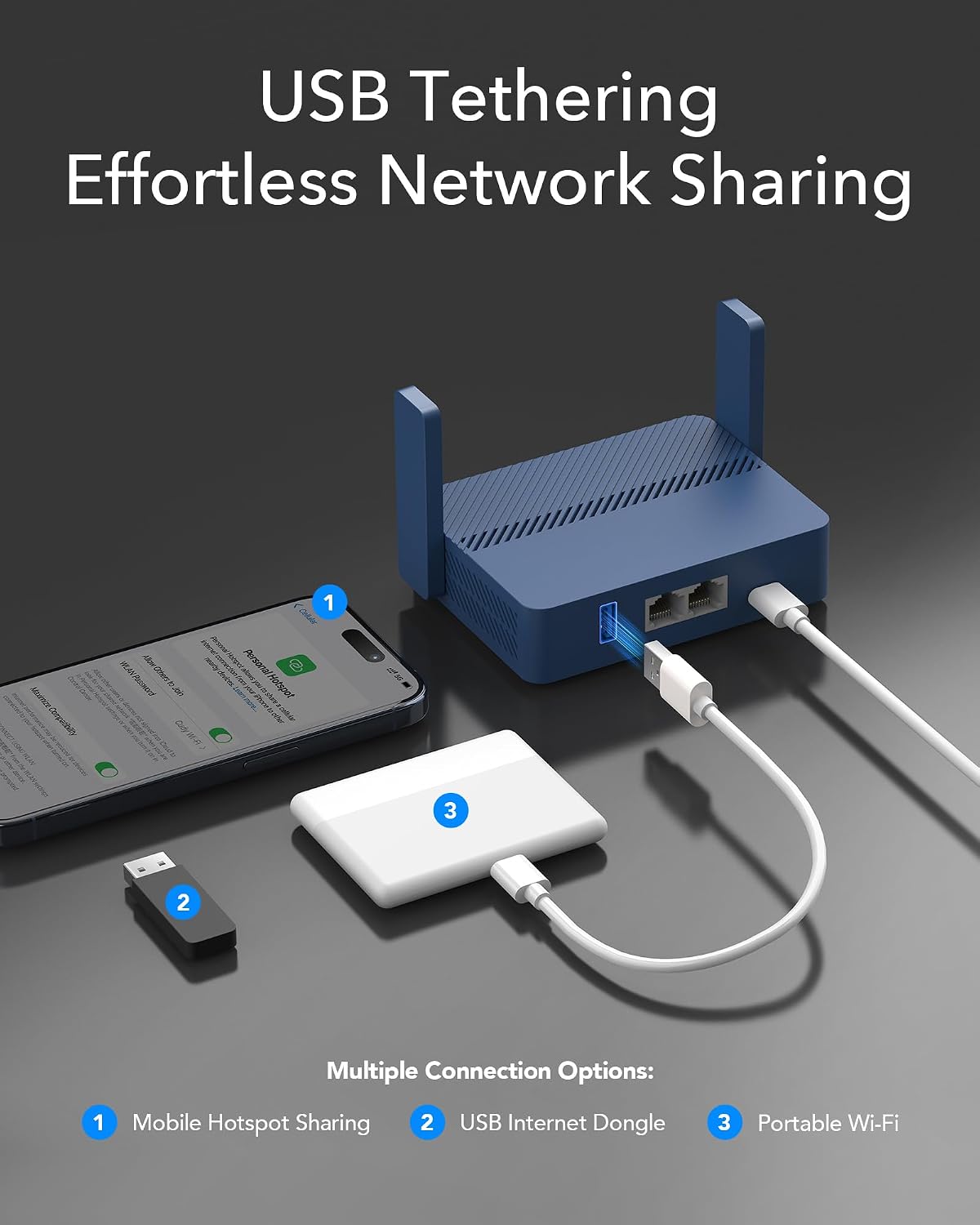
 USB Tethering
Simply connect a 4G/5G USB dongle to the TR3000, and instantly turn it into a high-speed Wi-Fi hotspot. Stay stable and fast, ensuring effortless travel and seamless access to high-speed internet wherever you go.
Pocket-Sized Mighty Functions 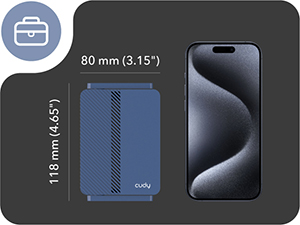 Lighter, Smaller than Phones
Weighing only 160 g (5.64 oz.) with a pocket-size design, the TR3000 is a travel-friendly network companion.
 Power with your Laptop
Power it with your laptop or phone charger through the USB-C Power Jack. The third-party power supply needs to be 5V / 3A or equipping PD.
 Click! Your VPN is On.
A configurable switch allows you to quickly toggle the VPN, without needing to enter the config page.
 Host Your Own NAS
Plug in your drive to host your cloud station with Samba protocol. Third-party software “X-plore” is required for Android systems.
Cudy Models Compatible with OpenWrt
Add To Basket
Add To Basket
Add To Basket
Add To Basket
Customer Reviews
4.5 out of 5 stars 268
4.3 out of 5 stars 1,021
4.6 out of 5 stars 253
4.3 out of 5 stars 167
Price
£49.90£49.90
£49.90£49.90
£59.90£59.90
£69.90£69.90
Support OpenWRT
Yes
No
Yes
Yes
Wi-Fi Speed
AX3000 (2402+574 Mbps)
AX3000 (2402+574 Mbps)
AX3000 (2402+574 Mbps)
AX3000 (2402+574 Mbps)
Flash/ROM
128 MB (1 Gbit) NAND
128 MB (1 Gbit) NAND
128 MB (1 Gbit) NAND
128 MB (1 Gbit) NAND
DDR/RAM
512 MB (4 Gbit) DDR3
128 MB (1 Gbit) DDR3
256 MB (2 Gbit) DDR3
256 MB (2 Gbit) DDR3
2.5G RJ45 Ports
1
–
–
1
Gigabit RJ45 Ports
1
4
5
4
A Pocket-sized High-performance AX3000 Wi-Fi 6 Router for Home and Travel. the TR3000 uses a 1.3GHz dual-core CPU, offers up to 3Gbps WiFi6 speeds, one 2.5Gbps Ethernet WAN port and one 1Gbps gigabit LAN port, one USB 3.0 Port, and multiple VPN support, making it perfect for everyday and travel use.
1.3GHz Dual-core ARM Cortex-A53 CPU High Capacity 802.11ax SoC, delivers super fast dual band Wi-Fi with speeds of up to 2402 Mbps on the 5 GHz band and 574 Mbps on the 2.4 GHz band. Exceptional wireless performance enables online gaming and HD video streaming at the same time, while large files can be shared with multiple devices.
Multiple High Speed VPN support. With built-in PPTP/ L2TP / OpenVPN / WireGuard /IPsec/ Zerotier VPN, this router can easily establish a connection to the VPN server to transport all your online data and traffic, securing it with its encryption at the same time. Provides Up to 150Mbps OpenVPN speed and up to 300 Mbps Wireguard Speed.
2.5Gbps WAN Ports. Equipped with one 2.5Gbps WAN port and one 1Gbps LAN port, the TR3000 can maximize the Internet speed of wired access.
Easy to share hotspot. Combined with multiple operation mode, including WiFi router mode, Wireless Access point mode, WiFi Extender Mode, WISP mode, which is easy to convert public network (wired/wireless) to private Wi-Fi for secure surfing. WISP mode works with Captive Portal. (Note: Most of the Free Public Wi-Fi hotspot set a time limit for users, which will disconnect your devices once the time is over. To deal with this situation, please reconnect your router to the wifi.)
13 reviews for Cudy TR3000 Small Portable WiFi 6 Router, Dual Band Gigabit Wireless Router for Home&Travel, Up to 3000 Mbps, VPN Server/Client/IPV6, 2.5Gbps WAN Port
Add a review
Related Products



£49.90


djlonboy –
Great little wireless router
I use this as a wireless router for my studio. Works perfectly with speeds almost identical to direct ethernet connection. Setup was very easy. The form factor is also very compact, I will also use this when I go on holiday to set up my own private networks.
Eastbourne –
Cudy travel router
Impressive device, excellent features, strong coverage, straight-forward connectivity, and provides a turn of speed.
AC1435 –
Very good for the price.
I’m using this to run a permanent VPN access point in WISP mode from my main router.It works well, VPN can switched off and on with the little slider on the side and performance is good.Performance wise this is far superior to any GL.iNet offering at this (sale) price point but about 10% down on the Gl.iNet power equivalents (Beryl 3000 and Slate AX-1800) running with no VPN and a shade more perhaps 15% when running a VPN.The stock firmware is more complete and more recently updated compared to Cudy’s cheaper orange travel router and overall I would say it’s a good buy at the price and can always be flashed to OpenWRT if that is wished for or required.
Edric_the_Destroyer –
Splendid Isolation
Lets me use a firewall to provide my own IP ranges within my caravan whilst still using a common IP address range provided by the caravan site owners. What I mean is everybody else is on the same IP range and can ‘see’ each others shared IT assets such as printers etc. Not secure but it is free. Using this unit I now have a firewall between me and them and it provides my own range of IP addresses to my devices. I then use a separate VPN to access the Internet so anybody trying to eavesdrop just sees encrypted traffic. thi s overkill but I work in security so paranoia is my first and last name. Nice piece of kit – easy to setup. Note: Make sure you apply the latest firmware updates before you use it.
Heather Colley –
Worked out the box
Using as an access point in my outhouse that connects to the main router in the house. Set to AP mode in the router software. Pretty much worked out the box. No real issues.
Lawson –
Amazing portable router
Make sure you update the firmware. Great little device. Easy to set up and use and works amazingly with zerotier if you want a mobile VPN device to the office or home.
D. Scott –
Not for me
Terrible. Worked one. Tried live on client site wouldn’t even work via ethernet. When I tested via my phone connected to the correct ports, worked for about 5 mins. Just keeps losing connection. Even though I had the latest firmware updates. I’ll try another manufacturer.
John Horton –
Easy to setup
Great router for hotel or campsites
farhad ashabi –
Ich nutze den Cudy AX3000 nun seit fast drei Monaten und bin wirklich sehr zufrieden. Das Gerät hält absolut alles, was in der Beschreibung versprochen wurde. Bisher gab es keine Aufhänger, alles läuft sehr stabil.Neben der VPN-Funktion und den Sicherheitsfeatures nutze ich das Gerät auch als Netzwerk-Festplatte (NAS). Ich habe eine externe Festplatte direkt am Router angeschlossen und bin mit der Performance sehr zufrieden. Besonders positiv hervorzuheben ist auch die dazugehörige Smartphone-App. Sie ist sehr flüssig, intuitiv und äußerst praktisch für die tägliche Steuerung. Ich hoffe, dass die Leistung auch langfristig so bleibt. Ein top Produkt!
SMB –
This is a fairly decent travel/portable 5/6-in-1 router that seems well-built and works as expected without issues. The build quality is decent and it seems reasonably sturdy and robust despite the fact its shell is entirely made of plastic. It’s fairly small and compact and although it’s being advertised as a travel router or the like, it doesn’t really have to be and it can certainly be used as an ordinary router but the implication is of course that only has a LAN port which is likely not enough for most people if you require the highest speed possible.Don’t let its size deceive you; it’s packed with features with its default GUI; however, one of its strengths is the fact that it supports OpenWrt and indeed that’s one of the primary reasons for the order. In addition to all the extra features and functionalities offered from the point of view of a travel router, it still has the same level of flexibilities with the typical and standard modes of operations commonly found on most other routers/access points, which I’ll briefly outline below for those who aren’t familiar with these; however, I won’t go into much detail as it’s beyond the scope of this review.This router can operate in one of the 4 modes (selectable via the default web GUI);❶ Router mode: this mode turns the wireless range extender into a full blown standalone router that connects to the modem (typically provided by the provider but some providers allow you to use your own as well). In his mode, a NEW wireless network is created which this device is responsible for in its entirety, from routing, security, and all management tasks associated with it.❷ AP (Access point) mode: this is the simplest of them all and basically creates a new (if you don’t already have one) or another wireless network with a new SSID (aka Wi-Fi name that you connect to). In this mode, this device is connected to a switch or a router using a physical cable. When your phone connected to the newly created wireless network, it access the internet through the wired connection between this device and the switch/router and finally out to the Internet.❸ Repeater/extender mode: this allows you to extend, as the name suggests, your existing wireless network by repeating or relaying its signal so your existing wireless network can be reached further by other devices. Note that any devices operating in this mode will automatically cut the speed in half (in theory but usually slightly more) when it’s used at full capacity because the repeater needs to talk to the original wireless network and you.The repeater needs to spend time and effort (and in this case, bandwidth) to talk to both sides in order to extend the coverage. As you can imagine, having a repeater in the middle between you and the existing wireless network (where it can’t reach you) simply means you trade the accessibility (i.e. you can reach the existing network that you wouldn’t be able to otherwise without the extender) with reduced speed.You’d need to enter the name of the existing wireless network that you wanna connect to as well as its password. You can choose to use a different SSID (wireless network name of THIS repeater) or use the same name as the existing one).❹ Wired-to-Wireless-converter (LAN cable) mode (aka client mode): this is one of the modes that many others support although it’s becoming quite common even for budget routers/access points. As the name suggests, you’d first configure it as a repeater by connecting this repeater to the existing wireless network (as mentioned in previous mode). After everything is configured in repeater mode, connect this repeated using the supplied RJ45 cable to an existing device that’s wired only (i.e. old desktop or smart TV with only Ethernet/network port).★ Note that this is actually a subset of the repeater mode and the difference between this and the one described above is simply that the computers are connected to this device via a physical cable (i.e. RJ45). This effectively converts the wired device into a wireless one so it can communicate to the existing wireless network, well, wirelessly.Doing so will allow and in some way, convert your existing wired device (i.e. old smart TV) into a wireless one that can access the Internet. The difference now of course is the fact that the repeater can be hidden behind the TV so is the RJ45 cable used to connect them. As you have probably guessed, this is only useful if you wanna turn an existing wired devices into a wireless for the benefits of being, well, wireless and not necessarily performance.###≡ Initial setupThe setup is pretty straightforward as most other such devices nowadays with the guided process. Note that you will need to be able to access 192.168.10.1 in order to configure it so if your existing home network isn’t using 192.168.10.0/24 subnet, the easiest way is for you to connect and configure to this device is to use your phone to connect to it via Wi-Fi (as its default mode is AP which your phone can easily connect to), configure it (i.e. change the subnet to match your existing one) using a browser on your phone/tablet, and connect to it again using computers/laptop or whatever else you have.It has 2x [high/med] gain external antennae (1x 4.8 dBi for 5 GHz and 1x 3.9 dBi for 2.4 GHz band) which is decent for extending the signal HORIZONTALLY (i.e. not for upstairs/downstairs relative to its location); however, this is not exactly good for extending signals vertically compared to those with 3 dBi because the higher gain it has, the flatter the coverage volume it is. It also has an internal antenna for detecting DFS to minimize disruption with the 2x external antennae, which is great. It’s capable of 2 spatial streams (MCS 11, 1024-QAM, 0.8 ns GI) using 160 MHz channel to achieve a max of 2402 Mbps (well, theoretically) via the 5 GHz band. Likewise, it’s capable of 574 Mbps using 2 streams (2x 286.8 Mbps) via 2.4 GHz band (MCS 11, 40 MHZ channel, 800 ns GI, 1024-QAM).As for the initial setup, I opt for the old fashioned way of using IPs because I’m not big fan of, well, anything else, whether it’s an app or using the FQDN (cudy[dot]net). The web GUI (192.168.10.1) is for the most part intuitive and functionally similar to just about all others out there since the common feature sets are more or less the same with most other brands/models. What set this apart from the rest are of course its VPN (server/client) capabilities using WireGuard and OpenVPN etc.I won’t go into any details on how to configure it because the user guide does a decent job at that and there are plenty of other resources for that. Note that quite a few different vendors actually use the same IP, including but not limited to D-Link, Wavlink, TP-Link, Motorola, TRENDnet, ZyXEL etc. Btw, there is no default user and you’ll set the passwd when you first login; however, the default passwd for the Wi-Fi is printed at the bottom of the router if you choose to connect to it wirelessly. The default 2.4 GHz SSID is Cudy-XXXX and Cudy-XXXX-5G for the 5 GHz band.≡ OpenWrtAs aforementioned, one of the primary reasons for purchasing this router is that it supports OpenWrt and the latest 24.10.x branch. There are quite a few models from Cudy that offers seemingly similar features; however, the devil is in the details that often get omitted. Basically, the WR3000 is the most basic model that you should avoid if you plan on using OpenWrt since it only has 16 MB of flash (256 MB RAM) which isn’t enough or barely enough for additional features with OpenWrt. Basically, you will want at least 128 MB of flash at this point in time to comfortably use OpenWrt as a full-feature alternative (i.e. with add-ons).On the other hand, WR3000E/S (128 MB flash/256 MB RAM) has a decent spec and so does WR3000H which has the same flash and RAM as this travel router (TR3000). Of course, the downside of this router is that it only has 1x GigE for LAN but it does have 1x 2.5 GigE port for WAN that none of the models have with the exception of WR3000H. However, none of them have a USB 3.0 port so if that’s something that you might require, this travel router is a no brainer. I should also mention that this particular model is quite comparable to GL-MT3000 (Beryl AX) from Gl.iNet and in fact they are nearly identical except that MT3000 has 256 MB of flash but it also requires 50% more dough, so that’s an easy decision for me. Btw, all of these mentioned above use Filogic 820 processor (ARM A53) as opposed to the outdated MT7621 (MIPS) that has existed for over a decade.Installing OpenWrt on this travel router is fairly straightforward and the documentation provided by OpenWrt is excellent as far as documentations go. You shouldn’t run into any issues if you follow exactly what’s being outlined. The latest stable version is 24.10.5 which is what you want (unless you have reasons to use older versions but it’s up to you really) and there are 3x firmware types to choose from for TR3000; select the ‘Cudy TR3000 v1’ as starting point. The one that says “OpenWrt U-Boot layout) is for modified U-Boot layout (i.e. OpenWrt’s U-Boot layout) which isn’t required; but it does free up an additional of 50 MB, so it’s up to you whether you wanna switch to OpenWrt U-Boot layout or not AFTER you have OpenWrt installed.I also also mention that in order to install OpenWrt, you must install an intermediate firmware provided by Cudy (TR3000 V1_20251118.zip) to allow you to install the latest firmware from OpenWrt. The intermediate firmware is essentially a custom OpenWrt firmware signed by Cudy to facilitate the installation of firmware from OpenWrt since the stock/factory firmware is locked and only allows firmware with valid digital signature from Cudy.Again, there are plenty of online resources out there that details everything that you need to do (and more) and I’m not gonna repeat those; however, I’ll just say that it performs fairly well with the default GUI (if you have no desire to fiddle with the firmware or the like) and it should be more than adequate for what you wanna do with a router such as; though, I haven’t really tested WireGuard much and can’t be certain whether it’s actually capable of 234 Mbps as advertised.On the other hand, if you are interested in OpenWrt and wonder if it’ll work and/or how well it works, it’s fairly decent given the price tag and it’s amongst one of the best that I’ve tested so far, all things considered.≡ PerformanceSo how does it perform? Well, it’s pretty decent considering its size and everything else. It’s not the best that I’ve seen based on its 802.11ax spec (i.e. 2402 Mbps) but it’s more than good enough given the circumstance. I should also mention that one of the other requirements for me is that it must be powered by a USB-C and this indeed is. It draws about 2.5W (5V/0.5A) or thereabouts without external devices attached and a USB-C/DC adapter is also provided, which I do appreciate and that’s certainly a point in its favor since some others don’t come with any.Here is the result from some quick tests for those who are interested.#### iperf3 -c 10.10.10.153 -i10 -t 60 -P1 # single threadConnecting to host 10.10.10.153, port 5201[ 5] local 172.29.133.117 port 46058 connected to 10.10.10.153 port 5201[ ID] Interval Transfer Bitrate Retr Cwnd[ 5] 0.00-10.00 sec 946 MBytes 794 Mbits/sec 519 1.97 MBytes[ 5] 10.00-20.00 sec 931 MBytes 781 Mbits/sec 0 2.32 MBytes[ 5] 20.00-30.00 sec 908 MBytes 761 Mbits/sec 129 2.34 MBytes[ 5] 30.00-40.00 sec 890 MBytes 747 Mbits/sec 1264 1.46 MBytes[ 5] 40.00-50.00 sec 929 MBytes 779 Mbits/sec 0 2.21 MBytes[ 5] 50.00-60.00 sec 930 MBytes 780 Mbits/sec 6 2.45 MBytes- – – – – – – – – – – – – – – – – – – – – – – – -[ ID] Interval Transfer Bitrate Retr[ 5] 0.00-60.00 sec 5.40 GBytes 774 Mbits/sec 1918 sender[ 5] 0.00-60.00 sec 5.40 GBytes 773 Mbits/sec receiver####### iperf3 -c 10.10.10.153 -i10 -t 60 -P2 # 2 threadsConnecting to host 10.10.10.153, port 5201[ 5] local 172.29.133.117 port 52218 connected to 10.10.10.153 port 5201[ 7] local 172.29.133.117 port 52224 connected to 10.10.10.153 port 5201[ ID] Interval Transfer Bitrate Retr Cwnd[ 5] 0.00-10.00 sec 376 MBytes 316 Mbits/sec 225 1011 KBytes[ 7] 0.00-10.00 sec 531 MBytes 446 Mbits/sec 278 1.12 MBytes[SUM] 0.00-10.00 sec 908 MBytes 762 Mbits/sec 503- – – – – – – – – – – – – – – – – – – – – – – – -[ 5] 10.00-20.00 sec 418 MBytes 350 Mbits/sec 0 1.14 MBytes[ 7] 10.00-20.00 sec 471 MBytes 395 Mbits/sec 1 1.39 MBytes[SUM] 10.00-20.00 sec 889 MBytes 746 Mbits/sec 1- – – – – – – – – – – – – – – – – – – – – – – – -[ 5] 20.00-30.00 sec 478 MBytes 401 Mbits/sec 3 1.17 MBytes[ 7] 20.00-30.00 sec 434 MBytes 364 Mbits/sec 51 1.06 MBytes[SUM] 20.00-30.00 sec 911 MBytes 764 Mbits/sec 54- – – – – – – – – – – – – – – – – – – – – – – – -[ 5] 30.00-40.00 sec 424 MBytes 355 Mbits/sec 725 1.26 MBytes[ 7] 30.00-40.00 sec 472 MBytes 396 Mbits/sec 962 1.71 MBytes[SUM] 30.00-40.00 sec 896 MBytes 752 Mbits/sec 1687- – – – – – – – – – – – – – – – – – – – – – – – -[ 5] 40.00-50.00 sec 442 MBytes 371 Mbits/sec 0 1.40 MBytes[ 7] 40.00-50.00 sec 481 MBytes 404 Mbits/sec 1 1.52 MBytes[SUM] 40.00-50.00 sec 924 MBytes 775 Mbits/sec 1- – – – – – – – – – – – – – – – – – – – – – – – -[ 5] 50.00-60.00 sec 459 MBytes 385 Mbits/sec 260 1.41 MBytes[ 7] 50.00-60.00 sec 442 MBytes 371 Mbits/sec 264 1.22 MBytes[SUM] 50.00-60.00 sec 901 MBytes 756 Mbits/sec 524- – – – – – – – – – – – – – – – – – – – – – – – -[ ID] Interval Transfer Bitrate Retr[ 5] 0.00-60.00 sec 2.54 GBytes 363 Mbits/sec 1213 sender[ 5] 0.00-60.00 sec 2.53 GBytes 363 Mbits/sec receiver[ 7] 0.00-60.00 sec 2.77 GBytes 396 Mbits/sec 1557 sender[ 7] 0.00-60.00 sec 2.76 GBytes 396 Mbits/sec receiver[SUM] 0.00-60.00 sec 5.30 GBytes 759 Mbits/sec 2770 sender[SUM] 0.00-60.00 sec 5.30 GBytes 758 Mbits/sec receiver###773 Mbps isn’t bad but it’s still shy of ~ 938 Mbps that I’ve gotten from some others. Note that this is done via GigE so it’s limited to about 930 Mbps or thereabouts. If you have 2.5 GigE, you can probably get up to 1400 Mbps under ideal situations (i.e. line of sight/no walls etc.).The elephant in the room (well, for some anyway) is perhaps the fact it has a single LAN port; however, it’s easy to get another 5- or 8-port switch if needed. Of course, that’s an additional cost but for me, the benefits it provides (i.e. USB-C powered with 2.5 GigE along with 128 MB flash512 MB RAM) easily outweigh the lack of LAN ports with which I can easily replace (with those so-called 1×2/3/4 Ethernet splitters that can be powered by USB-C as well).≡ ValueAll things considered, this is a fairly decent USB-C-powered travel/portable router that’s well-built and for the most part well-performed. It has decent spec for flash/storage (128 MB) and RAM (512 MB) as well as a newer processor specifically designed for routers such as this (i.e. 2.5 Gbps, 160 MHz, and faster VPN speed).The built-in GUI provides a decent set of features with flexible configuration settings and it’s better than just about all other budget routers/access points. The fact it supports the latest OpenWrt (24.10.x) without issues means it can go one step further where few others can reach at this price point (and with the size/features that it has). It’s a truly versatile [travel] router that’s compact, easy to work with, and performs well. It’s reasonably priced at $70 for what it provides and its overall build quality, features, usability, versatility, and performance.
Liudmyla –
Installato con la sua configurazione,direi ottimo menù per vari utilizzi ,inoltre ho collegato con VPN wireguard
J –
I dont leave the house without it! I travel a lot for work, and this is the most amazing router I have ever had. Its quick, easy to connect. The best part about this router is its ability to connect to another wifi network using WISP. It allows your router to become its own NAT and keeps your network private. Its a great and safe way to use public wifi when you are not sure of its security. I love the ZeroTier networking capabilities and i have my own “Personal” network consisting of my home network, connected to my “work location” network and this portable solution. I can send printed material right to the house remotely. I purchased two of these and both my wife and I now have one. GREAT PRODUCT
Rafał Wójtowicz –
Bardzo fajny, bezproblemowy router dzięki któremu postawiłem sobie miniNAS w pokoju obok (dzięki złączu USB).