

AdaLov CPE660 Wireless Bridge Outdoor with Mounts, 5.8G Point to Point WiFi Bridge,14dBi High-Gain Antenna, 3KM Extend Network to CCTV, Outbuildings, Garden Office, Garage, IP65 Waterproof, PoE/12V DC
Original price was: £218.28.£144.81Current price is: £144.81.


Price: S$218.28 - S$144.81
(as of May 18, 2026 01:18:20 UTC – Details)
From the brand

CPE660 Long Range WiFi Bridges
Adalov CPE660 come with 2 bracket mounts, two 100Mbps ports,long range work distance up to 3KM with 14DBi high gain Antenna.

Since its inception, Adalov has been committed to advancing technology and building a strong brand.
Our mission is simple: to provide customers with practical and cost-effective data communication solutions, eliminating the hassle of traditional cable installations or the need for private lines.
Adalov wireless bridge

CPE469 Dual-Band WiFi Bridge
Stand Out with Dual-band 5.8GHz and 2.4GHz: CPE469 operates on the 5.8GHz & 2.4GHz bands for interference-free, low-latency performance

AdaLov has arrived with wireless bridges…
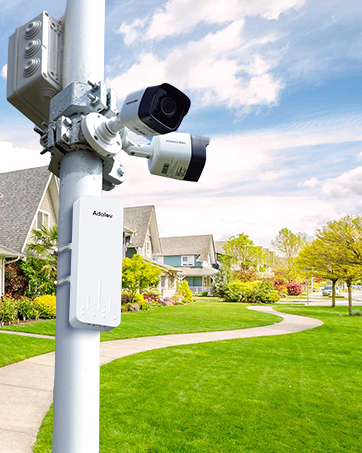
The wireless bridges pair perfectly with cameras, so no more worries about surveillance cameras losing network connectivity.

With AdaLov’s wireless bridges, there’s no need to dig trenches to deploy the network. Because AdaLov makes it possible!
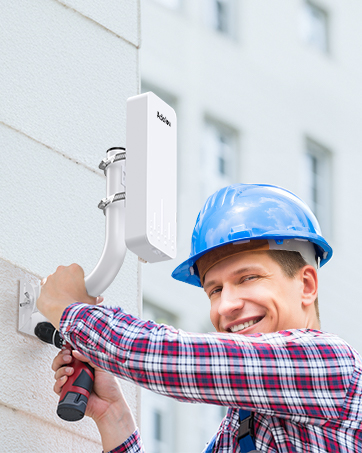
Installation is straightforward, and setup is simple.

Elderly people will be very pleased to have access to the Internet and to be able to benefit from all its possibilities.

Thumbs up! Thumbs up! Thumbs up!


Dual 100 Mbps Ethernet Ports: Equipped with two 100 Mbps LAN ports, allowing for seamless integration with various devices like CCTV cameras, access points, and network hubs
Extended Network Reach: Capable of extending your network up to 3KM (1.9 miles), ideal for seamlessly connecting distant buildings, barns, shops, farms, garages, warehouses, Starlink setups, or security cameras
Advanced 14dBi High-Gain Antenna: Ensures strong, directional signal transmission and reception, optimizing long-distance network performance
Easy Plug-and-Play Installation: Features pre-programmed WDS mode for effortless setup without needing to access the GUI, making it user-friendly and quick to deploy
Versatile Mounting Options: Includes two adjustable bracket mounts, offering flexible installation on walls or poles with both vertical and horizontal adjustment for optimal signal alignment
High-Speed Data Transfer: Operates on the 5.8GHz frequency band with data speeds up to 300Mbps, providing fast and stable connections for bandwidth-intensive applications
Durable Outdoor Design: Built with an IP65-rated enclosure, the CPE660 outdoor wireless bridge is waterproof, dustproof, and resistant to harsh weather conditions, ensuring reliable performance in outdoor environments
Cost-Effective Networking Solution: Reduces the need for expensive Ethernet cabling and leased lines, providing a budget-friendly alternative for extending networks over long distances
Multiple Operation Modes: Supports Point-to-Point (PtP), Point-to-Multi-Point (PtMP), AP, and Bridge modes, offering flexibility for various network configurations and use casesMultiple Operation Modes: Supports Point-to-Point (PtP), Point-to-Multi-Point (PtMP), AP, and Bridge modes, offering flexibility for various network configurations and use cases
Comprehensive Package and Support: Comes with everything needed for installation, including PoE adapters, mounting brackets, and cable ties, along with lifetime technical support
13 reviews for AdaLov CPE660 Wireless Bridge Outdoor with Mounts, 5.8G Point to Point WiFi Bridge,14dBi High-Gain Antenna, 3KM Extend Network to CCTV, Outbuildings, Garden Office, Garage, IP65 Waterproof, PoE/12V DC
Add a review
Related Products



Original price was: £218.28.£144.81Current price is: £144.81.


Geth –
WiFi extender I’ve used has
Awesome peace of kit so simple to set up and works a treat absolutely love it would highly recommend this to anyone that wants to extend the WiFi coverage, my man cave is about 50 mtrs from the house tried several but this is the bestComes with everything you need to get going straight away
Mark –
Plug and play set up
Simple to set up and works great – dual channel so 2 Ethernet connections and 2 networks working without any issues – really wish they would make this more POE compliant instead of 24v POE then it would slot in to the switch directly
paulears –
Simple to set up and effective.
The installation is simple and setup quite easy to do and the product works exactly as advertised. The mounting hardware comes with all the attachments and is useful. The unit is lightweight. The cables connect at the bottom and have a cover over the access point. There are no seals, but water should not be able to enter.
Tomtom –
It works
Really easy to set up, works very well. Using for a for a log cabin 80mtrs away.One of the units did fail but Camillia from Adalov was brilliant getting a replacement to me. Very happy with Adalov.
Pete –
Works well and easy to setup
Works well and easy to setup. Tried it to the bottom of the garden to an office which is about 30m away. When it is raining, the bandwidth reduces but it was still useable.
Clive –
Simple effective WiFi solution for an outbuilding
This was really easy to setup and came with everything you needed in the box (other than any cable you need to attach the transmitter/receivers (obv this will be different for everyone), and an old router I used to be the ‘wifi’ at the end). Seems really good quality.I sent through a window in my house to a log cabin 30m away, and got 70mb WiFi (only have 100mb in my house, so minimal loss). Easy instructions. Would recommend.
John P. –
Good Product
Good solid product, no issues does what its meant to do. I was worried about weather proofing, but its survived through 2 storms so far, time will tell. Happy so far! Was easy to setup and the instructions were OK, connected 1st time.
Tiffany McGarry –
Excellent customer service and product
I bought this adalov bridge to send WiFi to two buildings at the bottom of the garden, the furthest one being approximately 150 metres away from the house.The internet coverage was none existent and network signal here is awful.I’m not very tech savvy so it wasn’t long before I started to struggle with the instructions and I couldn’t figure out what I was doing wrong.I emailed customer support at adalov explaining exactly how far I’d managed to get before having issues with the set up.I received a prompt response from Joey, his customer service skills are second to none, he explained what I needed to do and even sent a short video with step by step instructions showing how to configure the bridges. It was much easier to follow.It wasn’t long before everything was up and running, the coverage across the whole garden was excellent.Joey even sent a follow up email to see how I was getting on with the installation.My next dilemma was that I wanted to get good wifi into the buildings and I wasn’t sure what equipment was needed.I messaged Joey again who was more than happy to help.With the addition of a router, I now have excellent WiFi across the whole garden and inside both of my buildings.Thank you so much Joey, I couldn’t have done it without you.
Dallas Rauch –
Spent $200 on this and it was missing half the equipment. It is obvious it has been returned before we received it. Very disappointing
Tom Dunnavant –
I spent 30 years in computer and network sales, but have been home building and inspection for 20 years. I’m 73 years old. I did the test/install with no outside help.I used this bridge to provide Internet and streaming to a “guest house” located 500 feet from my home. I read the reviews, bought a simple inexpensive bridge, a long Cat6 ethernet cable and a cheap router form Walmart.The only issue I encountered was the shipping lead-time but I’m spoiled be too many overnight shipping. Shipping took almost 2 weeks, but it was worth the wait.I have yet to do a hard install of the product but should be able to complete that today. The first thing I did was to take the 300 ft buriable Cat6 and connect it to my service provider and attach a the cheap router from Walmart. I set up in a default manner, changed the router name and the password and being rural with no neighbors in range to interfere, I was happy that the little router simply worked and I was getting a really strong signal. So, I let the little router just sit working until I was ready to install the bridge.My home is 6,000 sq feet under roof, 4000 ft inside and 2400 outside. Its a barndominum and although I have moved in and its a great place to live, I have yet to install ceilings on the porches, so there are open rafters there, but the materials are on-site and ready to install, but I’ve had a lot of fish to fry to get to the point where I can enclose. And, I’m hopping before winter, I will have finished the ceilings and a the ceiling fans I have set a side to install after the ceilings. Although they are large porches, the metal will go up rather quickly.Because of the configuration of my situation, the 300 ft cable would be able to allow me to bore one hole through a wall and into my front porch ceiling, and I used the long cable to run the transmitting bridge from the best location to hit the “guest house”. I’ll be doing the overhead cable today on the fron porch and back porch. Targeting a “hard install” this afternoon late.When the bridge finally arrived, I let it set unopened for two days then opened the package and did a test install through the 300 ft cable, to a POE inserter (included) and then on to the transmitting bridge. Then, I connected the receiving bridge about 15 feet away again installing the cheap Walmart router to power, and running the network cable in and out of the POE to the receiving bridge. Once the power was one, the equipment took over and paired. I was getting pumped, I hooked the new wifi router to a streaming tv and a laptop and did a speed test. OK, the though put was not stellar, the 300 ft cable was the issue was but 50 mbs was fine. The important thing, it worked out of the box.I did a soft install with the transmitter zipt ied to a broom that was zip tied to a kennel fence about 5 feet away from my planned hard install. I had to run an extension power cable to feed the POE. Total low tech install and Redneck installer (Me).On the receiving end, I connected the tested router to power and ethernet through the POE and hung the receiving bridge outside a window. I did not expect much but I was 500 feet away. Within in two (2) minutes I had wife in the building 500 feet away. Retraced my steps and did a speed test on my phone, and it was not stellar but 20 mbs was just fine for this application. The next step was to turn on a ROKU smart TV and selected the network setup, piece of cake. Within another 15 minutes the TV had updated and was ready for use, I spent a few moments removing unwanted apps and Installed 4 commonly used streaming services we have subscriptions to and we were cooking!So, I started with a quick almost side my side test, extended that to a 500 foot low tech install and and heading towards a hard install since proof of concept has been well established. I have a hole to bore, the long cable to run up into the rafters, down to a gas line near the foundation for 40 feet and then back up to the rafters to the planned transmitter location. I must install a simple 110 outlet near the mounting point to power up the POE and then turn my attention to doing a hardwire at the other end of the line. Point, works for our application. And, in total, my expenditure for this project is under $200. UPDATE: Hard wire completed, transmitting and receiving stations in place and getting about 45mbs on the receiving. Two tvs streaming, WIFI calling on cell phones and surfing just fine.
Alan M. –
These work great! We’ve only had them for a couple of months, but they didn’t fail us in severe rain storms. Easy to set up. Easy to connect to network. Range: 100 feet.
kawi –
I’ve now bought 2 of these, one for my camp and one for my shop. Work great .Effective means for getting internet inside metal buildings, extending signal etc. Had one for nearly 2 years with no problems. Installation instructions are good, but could do a better job of instructing how to set up your router
JASON MICHAEL –
Easy to set up and works perfectly… And I don’t know anything about tech things, I just followed the directions.