
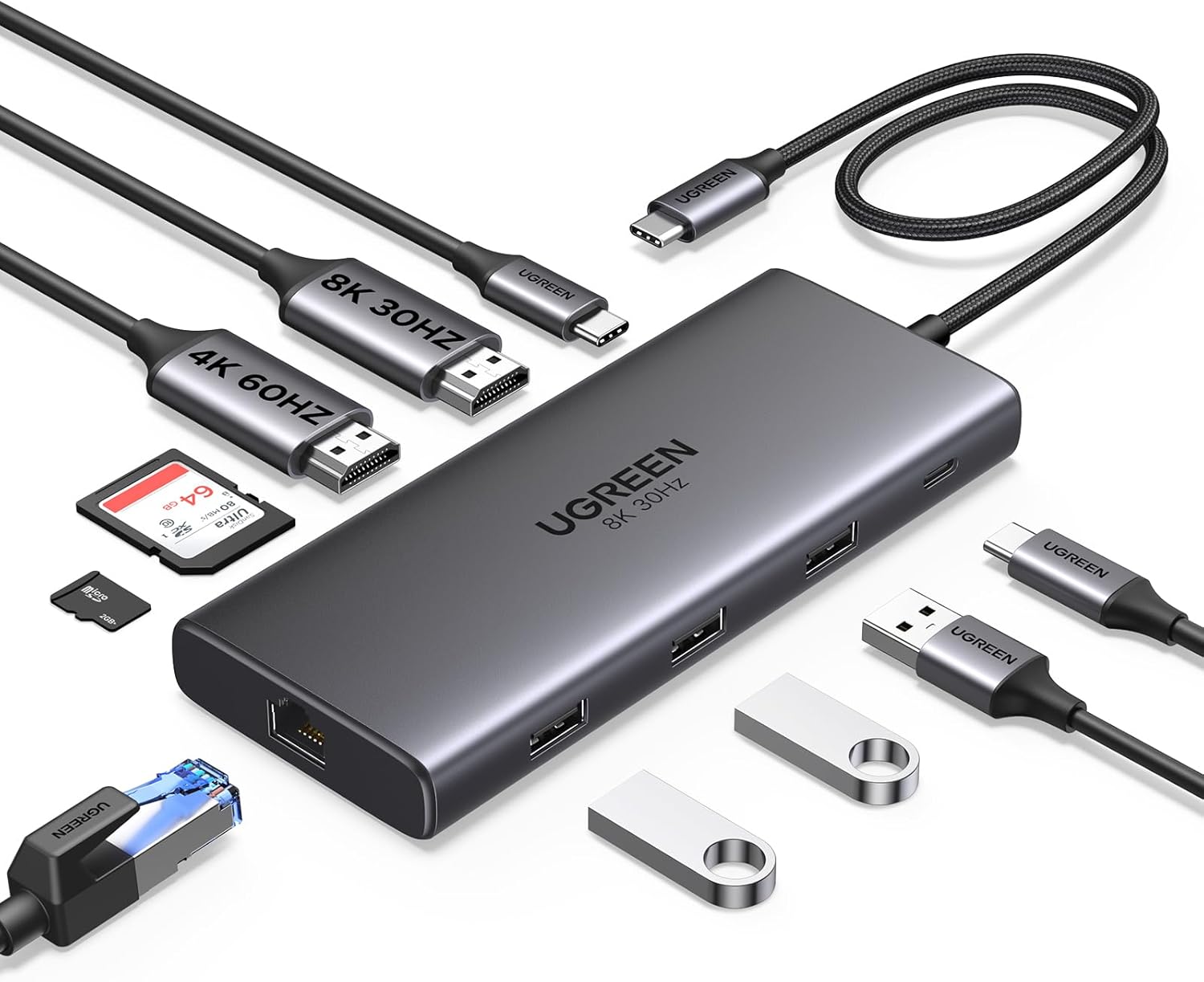
UGREEN Laptop Docking Station Dual Monitor, Revodok Pro 210 USB C Hub (10-in-1), Dual 4K@60Hz HDMI, Single 8K, 100W PD, 1Gbps Ethernet, 4x 5Gbps USB-A/C Data, SD/TF, Aluminum USB-C Dock for Dell, HP
Original price was: £49.99.£31.54Current price is: £31.54.


Price: £49.99 - £31.54
(as of May 13, 2026 09:55:02 UTC – Details)
From the brand

UGREEN TB5 Docking Station
Triple Display Dock with Power
Revodok Max Thunderbolt 5 Dock
Thunderbolt Docking Station
USB-C Docking Station
Mac Mini M4 & Steam Deck Dock
USB-C Hub
UGREEN Wireless Mouse Series
UGREEN Power Bank
UGREEN USB C Cable
UGREEN USB C Charger
UGREEN GaN USB C Charger
10-in-1 Connectivity: Laptop Docking Station provides all the ports you need for seamless connectivity. Two HDMI ports, a 100W USB-C PD port, a 5Gbps USB-C data port, a 5Gbps USB-A data port, two USB-A 2.0 ports, 1000Mbps Ethernet and SD/TF card slots
Dual HDMI Display: The USB C Hub will hook up two displays in 4K@60Hz max and enjoy cross-screen multitasking and creative workflows. (Note: For macOS, the display on both external monitors will be identical)
8K UHD Display: The HDMI 2 port on the USB C Dock delivers a maximum 8K@30Hz resolution for Windows users, offering stunning detail and vivid colors. (Note: To achieve 8K resolution, ensure your laptop’ s USB-C port supports DP1.4 with DSC (Display Stream Compression)
100W Power Delivery: Support for max 85W USB-C pass-through charging over the 100W USB-C PD port, so you can charge your XPS 15 laptop from a low battery to 60% in an hour. (Note: The USB-C PD port delivers up to 85W for charging the connected laptop and reserves 15W to power the hub; wall charger and cable not included.)
Transfer Files in Seconds: Transfer files, movies, and photos at speeds up to 5 Gbps via the USB-C data port and USB-A ports (Note: The USB-C data ports is for data transfer only, not for display and charging; the USB-C PD input only supports charging)
Ultra-Fast Ethernet: Enjoy ultra-high-speed internet connections via the 1000Mbps Ethernet port of the USB C Dock Dual HDMI
Broad Compatibility: Compatible with almost all USB-C laptops such as HP Envy x360, ThinkPad, ZenBook, Chromebook, and Surface, the Revodok Pro 210 Docking Station is the ultimate connectivity solution
Note: If you are using a MacBook and want to connect dual monitors with different displays, we do not recommend this docking station. For macOS, the displays on both external monitors will be identical
11 reviews for UGREEN Laptop Docking Station Dual Monitor, Revodok Pro 210 USB C Hub (10-in-1), Dual 4K@60Hz HDMI, Single 8K, 100W PD, 1Gbps Ethernet, 4x 5Gbps USB-A/C Data, SD/TF, Aluminum USB-C Dock for Dell, HP
Add a review
Related Products



Original price was: £49.99.£31.54Current price is: £31.54.


Hom –
Practical Docking Station with Good Connectivity for Surface Devices
This is a solid and well-made docking station that does exactly what it’s meant to do. The range of USB ports is very useful, especially if you need to connect multiple devices at the same time. Connectivity is reliable, and everything is recognised quickly when plugged in.It’s particularly good for Microsoft Surface laptops and tablets, which don’t come with HDMI or enough built-in ports. This dock makes it much possible to connect two external monitors, keyboard, mouse, and other accessories without constantly swapping cables.The build quality feels good and durable, and it’s easy to use with a simple plug-and-play setup. Charging works well through the dock and keeps devices powered while in use, which is convenient for everyday work.Overall, it’s a practical and dependable docking station with good port selection, strong usability, and decent durability. A good solution if you need to expand connectivity on a Surface device or similar lightweight laptop.
Priyal Sharma –
Seamless multi-monitor setup with solid build and power delivery
This UGREEN USB-C docking station has been a fantastic addition to my work-from-home setup. It handles dual HDMI output flawlessly (4K @60Hz or 8K @30Hz), allowing me to connect two external monitors to my laptop without lag, flickering, or resolution issues – a game-changer for productivity.⚡ The 100W power delivery (PD) is more than enough to charge my MacBook while running multiple peripherals, and the data ports (USB-C + USB-A) have consistently maintained high transfer speeds with no disconnects or heat issues.The build is compact but premium-feeling, with a sturdy metal casing that stays cool and looks sleek on the desk. Setup was truly plug-and-play – no drivers or fiddling required.Pros:1. Drives dual monitors with no hiccups2. 100W PD for efficient charging3. Fast, reliable data transfer4. Solid build quality and compact designIf you need a reliable hub for productivity, streaming, or remote work, this is excellent value for money.
L. Calcutt-Scott –
Decent Hub – Works Fine but it’s not Perfect.
Decent hub and it works well for the most part. I have it connected via HDMI to 2x monitors, a QHD monitor and an ultra-wide monitor. Both display fine but I have noticed that my QHD monitor occasionally flickers or crackles. Not often enough to cause issues but I have noticed it because it never did this when connected direct to the laptop before I bought this hub. My other issue is that I have to reconnect my USB mouse to the hub every morning. When I shutdown my laptop I unplug the dock from the laptop (so the laptop isn’t constantly charging overnight!) and the next day when I reconnect it and power on my laptop, my mouse doesn’t work or power on. If I reconnect my mouse to the hub it comes alive. This isn’t a mouse issue as it works fine when connected to the laptop directly. I assume this is a bug with the USB-A ports not waking up properly after the dock has been disconnected from the laptop.Overall, the hub works fine. It is excellent value for money too. It’s small, hides nicely under my laptop stand and has plenty of ports. I also have my tablet connected via the hub to the hub’s USB-C port and it provides enough power to charge the tablet. I have the hub powered with a 65w charger, maybe it needs connecting to a 100w charger. It’s a bit annoying having to reconnect my mouse every morning but it’s a small issue, I can live with it.
JamieG –
Excellent hub for my M1 MacBook Pro.
Fantastic hub – works well with my 14” M1 MacBook Pro. Using with a single external 4k monitor @ 60Hz, a webcam, a mouse (wireless via USB dongle), and a wired keyboard. Absolutely no issues at all. All connected devices work without issue when unplugging the hub. I used it to switch between my work and personal laptop.The MacBook charging works well too! I use a 65W charger which delivers 55W to the laptop via the hub. I’m able to charge my phone alongside the laptop too using the available USB-C slot on the hub.100% worth the money!Note: I use a 1m USB-C extension cable so that the hub can sit hidden away down the side of my desk rather than sitting on my desk. If you do the same, make sure you get a cable that supports 100W PD and high data bandwidth. Mine is “UGREEN 100W USB C Extension Cable 10Gbps”. This is not a sponsored review, I promise! 😂WARNING: As stated on the product page, you CANNOT use multiple extended monitors with this hub. You will need a thunderbolt hub for this (very expensive).
LA –
great piece of kit, very good value
great piece of tech; does exactly what it’s meant to do, no fuss; 1 tiny gripe – it doesn’t mention anywhere that a driver is needed (which apparently windows will sense and download automatically) and the ethernet won’t fire up til that’s done. My windows was a bit slow on the uptake, and in a state of panic (no ethernet!), I went to AI to work out what was not working. It seemed to resolve by itself during this process – and then was fine.
Amazon Customer –
Works even better than expected!
Wow! I was skeptical about this device, as to whether it could really support all the devices it offers ports for. But I have tried other UGREEN devices before and have been impressed, so thought I would give it a go. First task was to try with my personal laptop, which is always fussy about getting a proper 100w power adapter connected. Somehow, this device channels enough power to my laptop, with multiple connected devices (2 screens, keyboard, mouse, speaker, and external USB storage) and the laptop does not complain at all. The next use case was to try my work laptop. This was a big ask, as I have many devices connected and usually use a very heavy duty docking station. But I wanted to try this as it is MUCH more portable. When I first plugged it in I thought there was an issue, as the laptop complained it was not getting enough power. But, despite that, the laptop stays at 100% power and no sign of poor performance. The unit can get a little warm, but nothing to worry about I believe. All in all it has been an excellent piece of kit so far. Lets hope it stays that way. Perfect for travelling. Would buy again.
Sergii –
It’s not just hdmi extender. It feeds power to my laptop and has a USB hub. So, the two monitors, kvm switch with keyboard and mouse, USB stick and the laptop power adapter, it’s all connected to this device. I only plug a single USB C cable to my laptop to get that all working, including power.This is just awesome!
Jimbo D –
I was skeptical but that might be age related haha. Anyway, I plugged it into my Lenovo laptop and ran a 100w USB-C cable from the hub to a 100w brick in the wall outlet. Plugged in my Ethernet cable into the hub and several other USB charging cables and it all worked! Yay! I haven’t plugged in any monitors yet. This along with the 100w brick and usb cable take up way less space and require only one brick to charge like 3 things plus the laptop. Lighter in my bag too. I’m happy with the purchase and it makes me feel younger because this is not something people in my age demographic know exists. I’m gen x and 51 but look like a millennial when I pull this baby out… except for the sense of entitlement, laziness, delusion and narcissism 😃. Just kidding my millennial friends. 😂
Stephen Marincel –
Very very good docking station. Exactly what I needed for my 2 monitors and wired internet connection. Just be mindful with the ethernet cable it needs to be the newer type being CAT 6 I believe as the older ones do not fit
Guilherme –
Work just fine. No heat.
K. –
J’utilise ce hub dans une configuration assez exigeante :– un PC gaming,– un MacBook Pro M1 pour le travail,– deux écrans (240 Hz en 2K et 160 Hz en 1080p),– clavier, pavé numérique, souris, enceintes, casque, micro XLR.Mon objectif : connecter mon MacBook avec un seul câble (charge + image + son + périphériques), sans perdre les performances du PC.Je me déplace souvent avec mon Mac, donc je voulais du plug & play propre et rapide.Après avoir cherché longtemps une station Thunderbolt capable de gérer deux écrans + la charge, je me suis rendu compte que la plupart sont soit hors de prix, soit incompatibles avec le M1.Ce hub UGREEN m’a littéralement sauvé le setup.Comment je l’utilise :Le hub est au centre du système :• il envoie l’image vers deux écrans (via HDMI),• il alimente le Mac en USB-C Power Delivery,• il reçoit le signal du KVM pour gérer clavier/souris/audio,• il fait transiter toutes les données sans aucune perte.De son côté :• le PC est branché en DisplayPort directement sur les écrans,• le KVM gère les périphériques,• et le hub sert de passerelle unique pour le Mac.Résultat : je bascule du PC au Mac en un seul clic, sans toucher au câblage.Le résultat concret :• Sur PC : je garde le 240 Hz en 2K sans aucun compromis.• Sur Mac : je récupère mes écrans, la charge et tous les périphériques via un unique USB-C.• Tout est stable, aucune latence, aucune perte de signal.• Le hub est robuste, ne chauffe pas et reste parfaitement fiable.Franchement, pour le prix, la qualité est au rendez-vous.⚠️ À savoir pour les utilisateurs de MacBook M1 :Le M1 ne gère officiellement qu’un seul écran externe.Pour en utiliser deux, il faut prévoir un boîtier DisplayLink supplémentaire (ce que je n’ai pas encore installé).Avec un seul écran, tout fonctionne parfaitement.Conclusion :J’ai mis du temps à trouver une solution propre, fiable et abordable pour fusionner un PC gaming et un MacBook M1 sur le même poste.Ce hub UGREEN est devenu la pièce maîtresse de mon setup.Il simplifie tout, il est stable, et il permet un vrai gain de confort au quotidien.Si ça peut aider des gens qui comme moi vivent entre deux monde PC et Mac, je recommande vraiment. Et honnêtement même en hub simple je recommande car il fonctionne parfaitement même pour un emploi détourné 😁